
Security and trust
Built for the security review.
How NovaQ and the Axon are put together, what they can reach, who can get in, and how access ends. Written for the people who have to sign it off.
Architecture
Users connect through NovaQ. Never directly to the site.
The Axon sits on the OT network beside the controllers and connects out to NovaQ. Users connect through NovaQ, never directly to the site.
No inbound firewall rules required.
Why hardware, not an agent
An agent borrows its host's security. The Axon brings its own.
- 01
Identity that can't be copied.
Keys live in the Axon's TPM chip and can't be exported. Agent credentials sit on disk and can be copied.
- 02
Nothing runs on your servers.
An agent inherits its host's patch level, admin users and malware. The Axon is its own device.
- 03
Smaller attack surface.
A purpose-built, hardened OS running only what it needs.
- 04
IT and OT stay separate.
The corporate network never needs a path to the BMS.
- 05
No domain credentials or local admin rights.
Nothing to join to your directory, and no privileged account to manage on a shared host.
- 06
One owner for the whole lifecycle.
Optergy builds, patches and retires every Axon centrally, with OS images matched to each hardware revision.
- 07
A physical off switch.
Unplug it and access ends.
- 08
Nothing to plug into.
No USB ports and no field inputs or outputs. Its terminals are power and serial only.
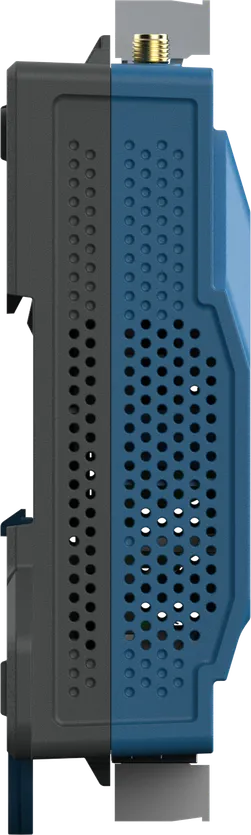
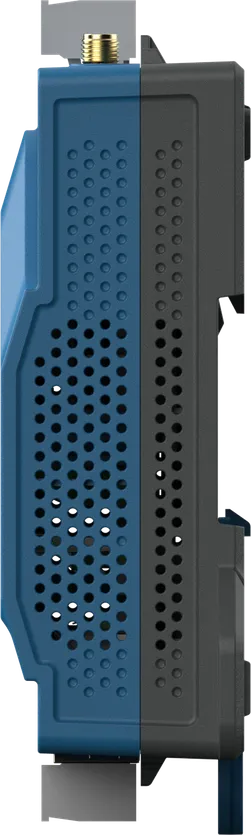
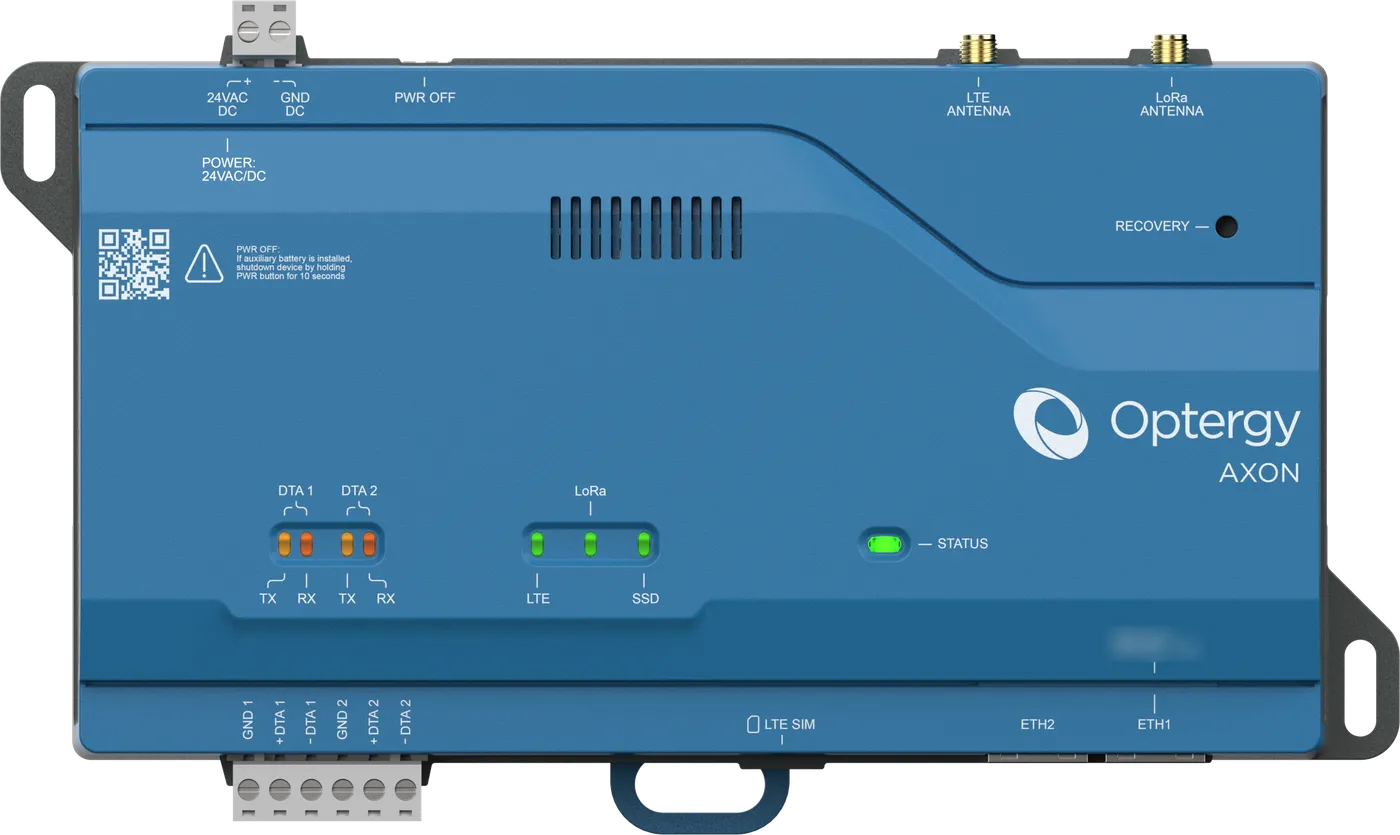
What is on the box.
Turn it over. Drag to rotate.
- 01
Power terminal
24 VAC or 24 VDC.
- 02
LTE and LoRaWAN antennas
Optional, chosen at order.
- 03
TPM chip, inside
Holds the Axon's identity. Its keys can't be exported.
- 04
Two RS-485 serial ports
No field inputs or outputs.
- 05
4G LTE SIM slot
Optional, for sites without a network connection.
- 06
Two Gigabit Ethernet ports
Separate subnets for the OT and corporate networks. The Axon does not route between them.
- ✕
No USB ports
Nothing to plug a stick into.
Zero trust controls
- 01
Every user verified: MFA and sign-in with Microsoft or Google.
People prove who they are before they reach any building, with multi-factor authentication and single sign-on.
- 02
Least privilege by feature and by site.
Access is granted per feature and per location, through groups. Nobody gets more than their job needs.
- 03
See and end any session, across every Axon.
Administrators see who is connected, to what, and can disconnect one session or all of them.
Microsegmentation by role
Each person reaches only the buildings and tools their job needs.
The Axon gives each site one controlled path to NovaQ. Inside that path, every person gets only what their role allows: which buildings they see, how they may connect, and for how long. Device and port limits are set on each Axon by the people who run the site.
How the 5 layers workHide the layers
- 01
Who you are
Groups grant the actions a role needs.
Permissions come from groups, never from the account, with a switch for each operation in each app. Save a role once as a template and apply it to every contractor group.
- User Groups
- Workflows & Permissions
- Workflow Permissions
Follows the person
- 02
Where you can go
Location scope, down to the building.
A restricted user sees only their locations and everything beneath them, in every app. Each Axon belongs to the locations it is installed in or serves, so scope decides which Axons a person can use at all.
- Restrict to locations
- Scope tab
- Serving locations
- Restricted Access Users
Follows the person
- 03
How you can connect
Each connection method is its own permission.
Host, VPN and Remote Connect are granted separately, so a contractor can open device web pages without a network tunnel. Seeing and ending other people's sessions are separate permissions again.
- Host
- VPN
- VPN to device
- SSH
- RDP
- VNC
- Connected Users
Follows the person
- 04
What the network allows
Every Axon sets its own reach.
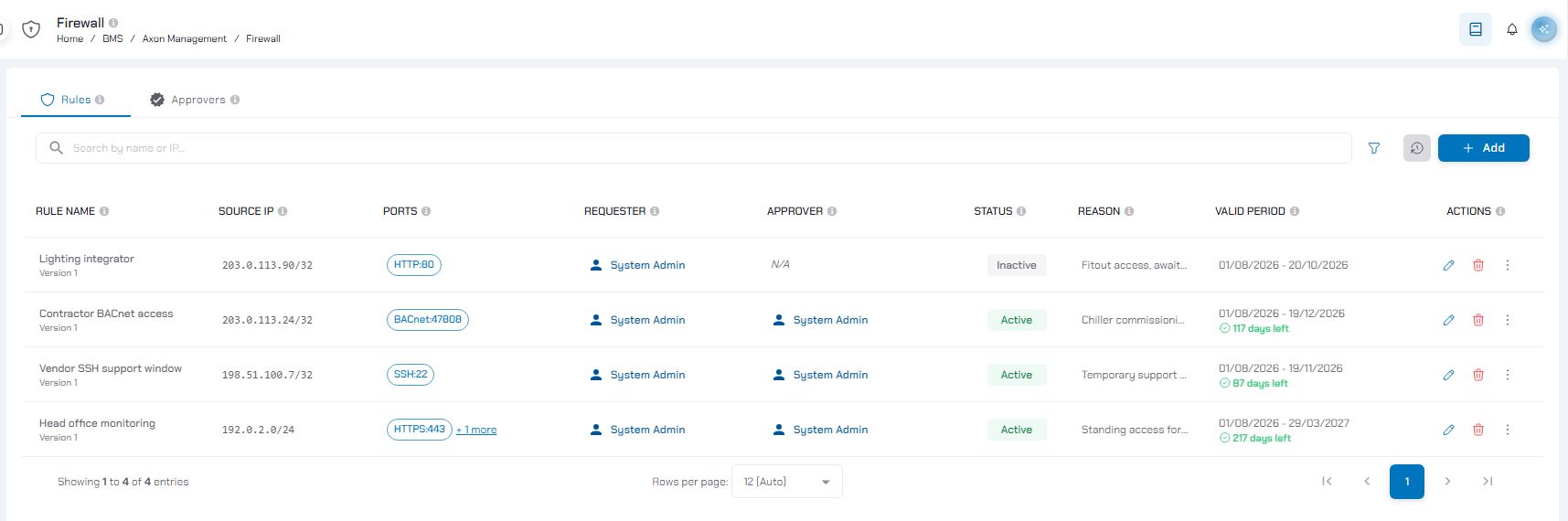
Host IP configurations list the address ranges and ports web access may reach behind each Axon. Firewall rules open named ports from a named source address, only after an approver signs off, and stop at their end date.
- IP configurations
- Firewall rules
- Approvers
- VALID PERIOD
Set on each Axon
- 05
How long, and how visibly
Sessions time out, and every one is recorded.
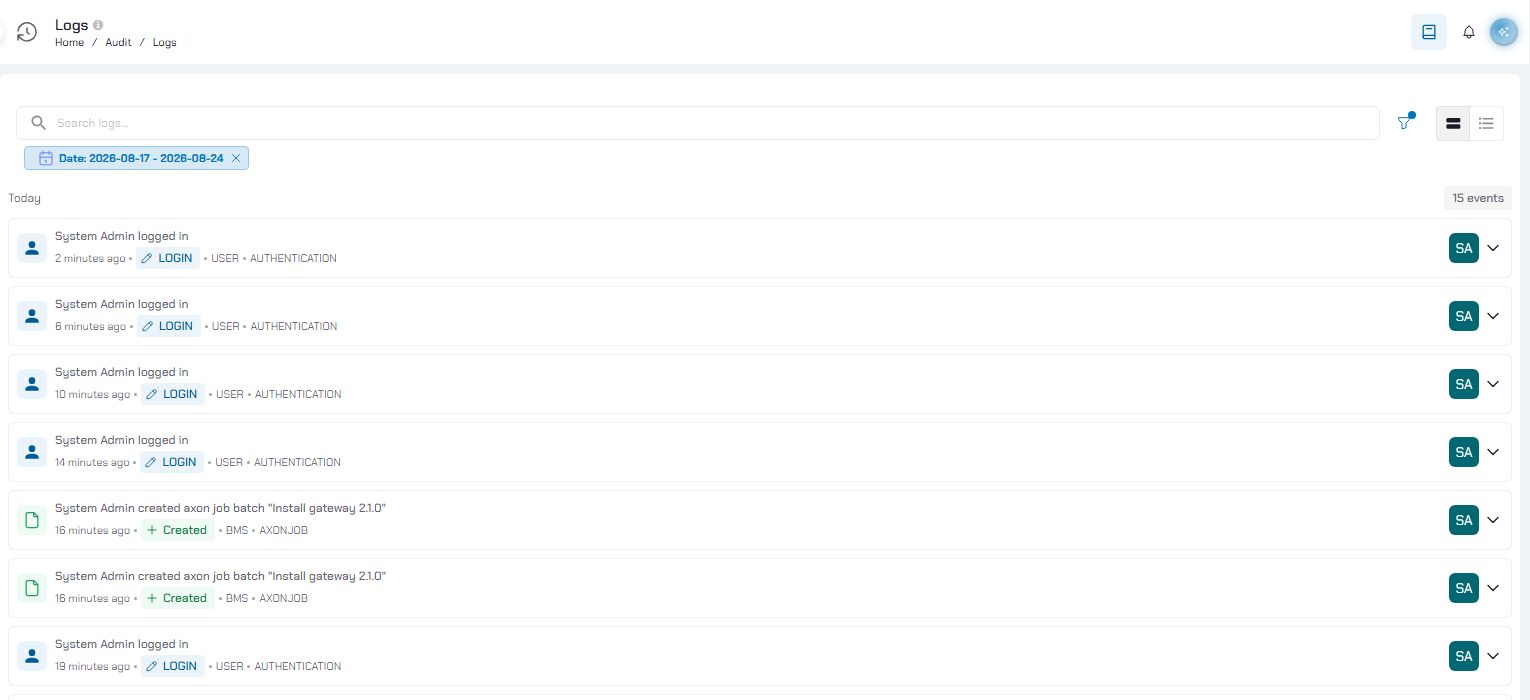
One VPN session per person at a time, and VPN and Remote Connect sessions end within 24 hours. Authorised staff see every live session and can end one or all, and every sign-in and change goes to an audit log that cannot be edited or deleted in NovaQ.
- One VPN Session at a Time
- Connections tab
- Disconnect all
- Audit Logs
Follows the person
Persona matrix
What each role can reach.
People who might work on the same portfolio, set up with the controls above. The same columns for every role, so the differences are easy to see.
- Full
- Allowed across the whole portfolio.
- Scoped
- Allowed, only for their buildings and the Axons that serve them.
- View
- Can see, cannot change or act.
- None
- Not granted.
| Role | Buildings and AxonsScope tab | Device web pagesHost | Remote desktop and shellSSH, RDP, VNC | Network tunnelVPN | Firewall rulesFirewall | Other people's sessionsConnected Users | Audit logsAudit |
|---|---|---|---|---|---|---|---|
| Mechanical contractorServices HVAC plant in a handful of buildings.Custom group from a contractor template | ScopedRestricted to the buildings they maintain. | ScopedPages inside each Axon's Host IP configuration. That list is set per Axon, not per person. | NoneNot granted in this example. | NoneNot granted. Add only if their tools need network access. | NoneCannot create or approve rules. Field-device ports open only through an approved, dated rule. | NoneSees only their own sessions. | NoneCannot read logs. Their own actions are recorded. |
| Lighting contractorMaintains lighting gateways on selected floors.Separate custom group, same template pattern | ScopedRestricted to the buildings or floors with lighting gateways. | ScopedPages inside each Axon's Host IP configuration. That list is set per Axon, not per person. | NoneNot granted in this example. | NoneNot granted in this example. | NoneCannot create or approve rules. | NoneSees only their own sessions. | NoneCannot read logs. Their own actions are recorded. |
| Facility managerRuns the buildings day to day for the owner.Built-in Facility Managers group | ScopedRestricted to their buildings or precinct. | ScopedAxons in their buildings. | ScopedAxons in their buildings, where configured and licensed. | NoneNot granted in this example. | ScopedCan be assigned as an approver for rules in their buildings. | ScopedSees and can end any VPN, Host or Remote Connect session in scope. | ViewCan be granted read access to audit logs. |
| Owner's auditorChecks who reached the owner's buildings, and when.Custom read-only group | ScopedRestricted to the owner's buildings. | NoneNo device access. | NoneNo device access. | NoneNo device access. | ViewCan be given read access to rules, without approval rights. | ViewCan see live sessions without the right to end them. | ViewReads who connected, to what and when. |
| Integrator engineerCommissions and supports controls across contracted sites.Built-in System Integrator group, or custom | FullWhole portfolio, or restricted to contracted sites. | FullEvery Axon in their scope. | FullWhere configured and licensed. | FullIncluding VPN to device. One session at a time, ending within 24 hours. | NoneCannot approve rules. Openings they need go to an assigned approver. | NoneThe built-in group cannot see or end other people's sessions. | NoneCannot read logs. Their own actions are recorded. |
Revocation
One action ends it.
Deactivate a person and they can no longer reach any Axon, at any site. No keys to collect, no shared passwords to change.
In the product
Access you can see and time-box.
Identity and access
Multi-factor authentication
Authenticator app, passkey, SMS or email as a second step at sign-in.
Microsoft and Google sign-in
People use the corporate identity they already have.
Per-feature roles
Permissions come from groups, per app and per operation. Never from the account itself.
Location scope
Restrict a user to the buildings they work on. They see nothing else.
Session visibility and disconnect
See who is connected to which device and end one session or all of them.
Fleet management
Software catalogue
One list of every package, container and OS image, by version.
Required software with compliance reporting
Define what each Axon type must run and see which devices fall short.
Bulk install and update
Install, update or remove software across many Axons in one job.
Backup and restore
Scheduled backups, with a fresh backup taken before every restore.
Compliance alignment
Where we hold a certificate we say so. Everywhere else, NovaQ and the Axon are designed to support the frameworks your organisation works to.
Certified
ISO/IEC 27001
ISO/IEC 27001 certified. Optergy is part of Oberix Group, whose information security management system covers NovaQ and is independently audited. Request the certificate through our Trust Centre.
In progress
SOC 2
SOC 2 audit in progress. The report will be published to our Trust Centre once it is issued.
Designed to support
IEC 62443
Designed to support the zone and conduit model for industrial automation and control systems.
Designed to support
ASD Essentials
Designed to support the remote-access actions in ASD Essentials for OT, the evolution of the Essential Eight: least-privilege access, session records and rapid disconnection.
Independent testing
Penetration testing and security assessment by CyberCX. Ask our security team for details.
Australian assurance
Designed to support ASD Essentials for OT.
How NovaQ and the Axon line up with the Australian Signals Directorate's newest guidance, action by action, and where our part stops.
What the Essentials are
In October 2026, ASD's Australian Cyber Security Centre released the Essentials series. It is the evolution of the Essential Eight into a broader, principles-based approach.
The series has three chapters so far: enterprise IT, operational technology (OT) and cloud. Each sets out actions grouped into domains, with phases that say what to do first.
Building management systems are operational technology. The OT chapter is the one that applies to NovaQ and the Axon, and its remote-access actions are where we can help most.
Organisations moving across from the Essential Eight no longer choose a target maturity level. Any existing obligation to report against the Essential Eight still stands while the transition runs into 2027.
Action by action: all 15 ASD actions, what is out of scope, sourcesHide the detail
Action by action
Where NovaQ and the Axon help, and where our part stops.
| Action | ASD asks for | What NovaQ and the Axon provide | Where our part stops | Fit |
|---|---|---|---|---|
| ASD Essentials for OT | ||||
| PRO-20 | Remote access is brokered, not routed straight into OT. | Site Connect and Remote Connect broker each session through NovaQ, so users never join the site network. | Secure Connect is a VPN and gives network-level access. Review it separately. | Designed to support, in part |
| PRO-20 | Access is time-bound, with no standing connections. | VPN and Remote Connect sessions end within 24 hours. Firewall rules carry an end date. | No user-inactivity timeout is documented. The 10-minute timeout applies when the VPN client or Axon goes silent. | Designed to support, in part |
| PRO-20 | Local operators know when remote activity is happening. | Connected Users and VPN USERS show who is connected right now, to which Axon. | This is a live view, not a notification to site staff. | Designed to support, in part |
| PRO-12 | Remote-access users are granted, tracked and reviewed, with least privilege. | Groups, permission templates, location scope, and per-building lists of who holds access. | Nothing to add | Designed to support |
| PRO-13 | Phishing-resistant multi-factor authentication on the way into OT. | Two-factor sign-in by authenticator app, email or SMS, and passkeys. A portfolio can require two-factor sign-in. | It is a portfolio setting. Passkeys are not offered at the code step after a password. | Designed to support, in part |
| DET-04 | Every remote session is recorded with user, time and target. | Audit logs record who connected, to what and when. Records cannot be edited or deleted in NovaQ. | Retention periods are confirmed with you in the security review. | Designed to support |
| RES-03 | Remote access can be cut quickly. | End one session or all of a person's sessions, or deactivate the person to end their access at every site. | Nothing to add | Designed to support |
| PRO-18 | OT communication is limited to approved pathways. | Each Axon lists the address ranges and ports web access may reach. Firewall rules open named ports from named sources, after approval. | These limits are set per Axon, not per person. | Designed to support |
| IDE-01 | An asset inventory, kept current with automated discovery. | IP, BACnet and Modbus scans run from NovaQ through the Axon. | Nothing to add | Designed to support |
| PRO-06 | Patches are tracked and applied. | Fleet shows software versions on every Axon and which fall short of the required set, with bulk updates. | Covers Axon software only. Patching controllers and workstations stays with you. | Designed to support, in part |
| PRO-10 | Firmware, configuration and logic files are backed up. | Building and device backups, with a fresh backup taken before every restore. | Backups are held in NovaQ, not isolated at each site. | Designed to support, in part |
| Essential Eight | ||||
| Multi-factor authentication | A second factor at sign-in. | Authenticator app, email, SMS and passkeys for NovaQ sign-in. | Applies to NovaQ access only, and depends on the portfolio setting. | Designed to support, in part |
| Restrict administrative privileges | Admin rights only for those who need them. | Administration in NovaQ comes from groups and templates, and users cannot change their own restriction. | Applies to administering NovaQ, not your corporate systems. | Designed to support |
| Patch applications and operating systems | Keep software up to date. | Software version tracking and bulk updates for the Axon fleet. | Axon software only. Not your corporate IT. | Designed to support, in part |
| Regular backups | Back up important data and test restores. | Backups of BMS device and Axon configuration. | Not a backup service for enterprise data. | Designed to support, in part |
Sources
- [1]
ASD's ACSC, ASD Essentials, October 2026.cyber.gov.au/essentials
- [2]
ASD's ACSC, What is the Essentials?, 15 October 2026.cyber.gov.au/publication/what-is-the-essentials
- [3]
ASD's ACSC, ASD Essentials for OT, 15 October 2026.cyber.gov.au/publication/essentials-for-ot
- [4]
ASD's ACSC, ASD Essentials for enterprise IT, October 2026.cyber.gov.au/essentials/essentials-for-enterprise-it
- [5]
ASD's ACSC, Transitioning from the Essential Eight, 15 October 2026.cyber.gov.au/publication/transitioning-from-the-essential-eight
- [6]
ASD's ACSC, Essential Eight Maturity Model, November 2023.cyber.gov.au/essential-eight
FAQ
Questions your security team will ask.
What do I need to open on my firewall?
Nothing inbound. The Axon starts every connection itself, so there is no inbound firewall rule, no port forwarding, no static IP and no dynamic DNS. Outbound, it needs HTTPS (TCP 443) to NovaQ, DNS and NTP, plus outbound UDP to the NovaQ VPN endpoints for Secure Connect. Peer-to-peer is an optional optimisation; declining it breaks nothing.
Can NovaQ reach our corporate network?
No. The Axon sits on the OT segment and tunnels only to targets you configure.
How do we revoke access?
Per user, per site, or per device, instantly from NovaQ.
Where is data hosted?
The hosting region is confirmed with you in writing as part of the security review.
What happens if an Axon is stolen?
Revoke its identity in NovaQ and it can no longer connect.